Berita Terbaru
 Nasional
 Internasional
 Ekonomi
 Sport
Sport Tekno
Tekno Sains
Sains Health
 Hobi
Hobi Tokoh
Tokoh Travel
 Lifestyle
 91
91
 14:54
14:54  24 April 2026
 20 Contoh Prompt AI Infografis Color Analysis yang Viral, Menarik Dicoba
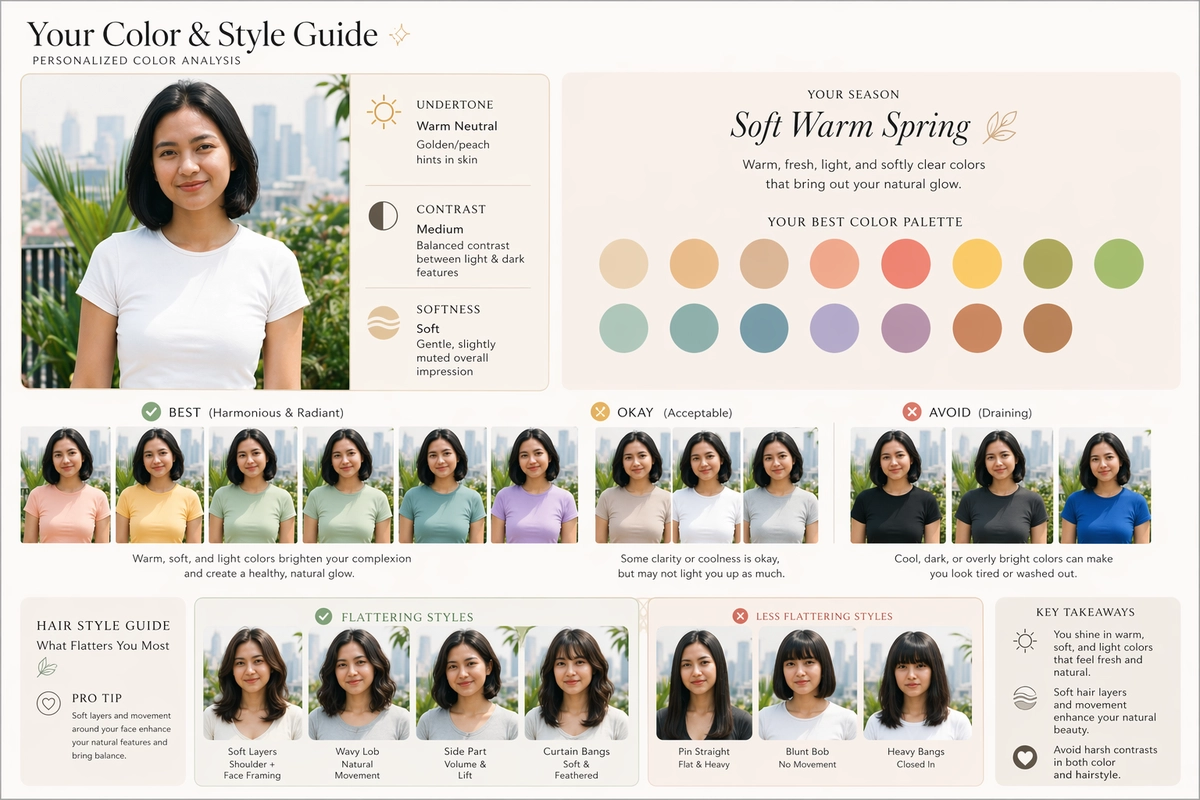
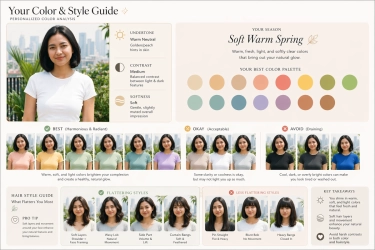
- Infografis yang memuat data color analysis dari foto pengguna, ramai dibagikan di media sosial (medsos) seperti Threads, beberapa waktu belakangan ini. Infografis ini pada dasarnya dibuat via AI seperti ChatGPT dan Gemini.
Dalam infografis color analysis ini, pengguna bakal bisa melihat palet warna pakaian atau kosmetik yang secara personal sesuai dengan warna kulit, wajah, dan mata. Selain itu, pengguna juga bisa melihat gaya rambut yang sesuai dengan wajah.
Baca juga: Cara Bikin Tren Caricature of Me and My Job ChatGPT yang Viral di Instagram dan TikTok
Infografis color analysis bisa dibuat melalui AI dengan memasukkan prompt atau teks perintah tertentu. Lantas, seperti apa prompt untuk membuat color analysis?
Jika tertarik untuk mencobanya, berikut KompasTekno rangkumkan beberapa prompt yang bisa dipakai untuk membuat color analysis seperti yang ramai dibagikan di medsos.
Contoh prompt color analysis yang ramai di medsos
- Create a clean, modern color analysis infographic using my uploaded portrait. Analyze my undertone, contrast, and overall softness, then assign a specific seasonal color type (e.g., Soft Warm Spring). Show my face consistently across color variations where only the clothing changes to illustrate “best,” “okay,” and “avoid” colors—each affecting how flattering my complexion looks. Include a hairstyle section using the same face, showing styles with soft layers, movement, and framing as more flattering, and styles that look flat, harsh, or overly structured as less flattering. Design it like a polished editorial graphic with soft tones, rounded sections, and subtle icons. Keep everything photorealistic and do not alter my facial features—only adjust colors and hairstyles.
- Create a personal color analysis graphic using this portrait. Show side-by-side clothing color comparisons to highlight which colors suit the subject best. Make it visual-first, with short labels only and no paragraphs. Also create a hairstyle analysis graphic using this portrait. Show side-by-side hairstyles comparisons to highlight which hairstyles suit the subject best. Make it visual-first, with short labels only and no paragraphs.
- Use my uploaded photo to generate a refined personal color and hairstyle analysis in a minimalist infographic style. Determine my seasonal palette based on undertone and contrast, then demonstrate flattering, neutral, and clashing colors by changing only the clothing around my face. Add a hairstyle comparison showing soft, layered looks as more suitable and rigid or flat styles as less suitable, keeping my face unchanged throughout.
- Create a soft, editorial-style beauty report from my portrait. Identify my most harmonious color palette and express it visually through multiple looks where my face stays the same and only outfit colors shift. Include a hairstyle exploration that highlights movement and natural framing versus styles that feel stiff or overly sharp, presented in a clean, balanced layout.
- Turn my face photo into a modern color analysis board. Evaluate my skin tone and feature contrast to assign a seasonal category, then show how different color groups affect my appearance using realistic clothing overlays. Add a hairstyle section comparing flattering volume and layers against flatter, less dynamic styles, all within a soft, aesthetic design.
- Design a polished personal styling infographic using my portrait. Analyze my coloring to define a specific seasonal type, then visualize the difference between enhancing and conflicting colors through consistent face placement. Complement this with a hairstyle comparison that favors softness and flow over sharp or heavy structures.
- Generate a beauty-style infographic from my image that feels like a magazine feature. Determine my best color harmony and illustrate it through variations in clothing color only, while keeping my skin tone natural. Include hairstyle variations that show why soft, dimensional cuts suit me better than flat or rigid ones.
- Create a cohesive personal color and hair analysis using my uploaded photo. Identify my seasonal palette and express it visually with flattering, neutral, and unflattering tones applied to clothing. Pair this with a hairstyle section showing movement and layers versus minimal or structured looks, all in a clean, modern layout.
- Produce a soft-toned infographic that analyzes my natural coloring from my portrait. Assign a nuanced seasonal type, then demonstrate its impact through clothing color changes around my face. Include a hairstyle comparison that emphasizes natural texture and framing against styles that feel too stiff or plain.
- Build a visually balanced color analysis graphic from my face photo. Define my ideal palette and show its effect through multiple looks with consistent facial features and varying outfit colors. Add a hairstyle section contrasting flattering layered styles with less suitable flat or overly structured ones.
- Transform my portrait into a personal styling guide with a focus on color harmony. Identify my seasonal category and present best, acceptable, and clashing colors through realistic visual examples. Include a hairstyle comparison that highlights softness, volume, and framing as key strengths.
- Create a clean, aesthetic beauty analysis using my image. Evaluate my undertone and contrast to determine my color season, then show how different shades influence my overall look by adjusting clothing only. Add a hairstyle section that compares natural, flowing styles with flatter or more rigid alternatives.
- Create a modern personal color and hairstyle analysis using my uploaded portrait. Determine my seasonal palette based on undertone and contrast, then show how different clothing colors affect my appearance while keeping my face unchanged. Add a hairstyle comparison that highlights soft, layered styles as flattering and flat or rigid styles as less suitable, all presented in a clean infographic layout.
- Use my face photo to produce a polished beauty infographic. Identify my most harmonious color palette and express it visually through consistent portraits with varying outfit colors, showing flattering and clashing tones. Include a hairstyle section comparing styles with movement and framing against those that feel stiff or overly simple.
- Turn my portrait into a refined styling guide. Analyze my natural coloring to assign a seasonal type, then demonstrate the impact of different color groups using realistic clothing overlays. Complement this with a hairstyle comparison that favors volume and softness over flat or structured looks.
- Generate a clean, editorial-style infographic from my uploaded image. Define my color season and visualize it through multiple variations where only the clothing changes. Include a hairstyle analysis that shows soft, dimensional styles as more flattering and rigid, minimal styles as less flattering.
- Create a soft-toned beauty analysis based on my portrait. Evaluate my undertone and contrast to determine my best color harmony, then present it through visual examples with consistent facial features and changing outfit colors. Add a hairstyle comparison that emphasizes natural movement and face-framing elements.
- Design a personal color and hair guide using my uploaded photo. Identify my seasonal palette and show flattering, neutral, and clashing colors through realistic variations. Include a hairstyle section comparing layered, flowing looks with flatter, less dynamic styles in a balanced infographic layout.
- Produce a minimalist beauty infographic from my face photo. Assign a specific seasonal color type and demonstrate its effect through clothing color changes while keeping my skin tone natural. Add a hairstyle comparison that highlights softness and texture versus styles that appear too sharp or plain.
- Create a cohesive styling report using my portrait. Analyze my coloring to determine my ideal palette, then visualize the difference between enhancing and conflicting colors through consistent portraits. Include a hairstyle comparison showing movement and layers as strengths and flatter styles as less suitable.
Itulah sejumlah prompt yang bisa dipakai untuk membuat infografis color analysis. Pengguna tak perlu mengikuti sama persis dengan prompt di atas jika hendak membuat infografis color analysis di AI.
Pengguna dapat menambahkan sendiri perintah untuk menampilkan data-data lain di infografis sesuai diinginkan seperti gaya kosmetik dan jenis aksesori.
Baca juga: Prompt Bikin Gambar “How I Treat ChatGPT” yang Viral di Medsos
Penting diingat, karya gambar yang dihasilkan program-program AI seperti ChatGPT dan Gemini sebaiknya tidak diklaim buatan pribadi. Pengguna juga sebaiknya tidak menggunakan foto orang lain tanpa izin.
Kemudian, data hasil analisis dari AI seperti yang tercantum dalam infografis color analysis sebaiknya tidak dijadikan satu-satunya sumber dalam mengambil keputusan. Pengguna bisa melibatkan profesional untuk menghasilkan analisis yang lebih akurat.
Dapatkan update berita teknologi dan gadget pilihan setiap hari. Mari bergabung di Kanal WhatsApp KompasTekno. Caranya klik link https://whatsapp.com/channel/0029VaCVYKk89ine5YSjZh1a. Anda harus install aplikasi WhatsApp terlebih dulu di ponsel.
Tag: #contoh #prompt #infografis #color #analysis #yang #viral #menarik #dicoba
KOMENTAR

BERITA TERKAIT
 14:54
14:54  24 April 2026
 BERITA LAIN DALAM KATEGORI INI